Showing posts with label cwm. Show all posts
Showing posts with label cwm. Show all posts
Saturday, February 18, 2017
Install CWM Root Samsung Galaxy Pocket
Install CWM Root Samsung Galaxy Pocket
Download dulu file yg diperlukan di bawah ini
Tools Root Pocket
Setelah di download akan ada 2 file zip
1. Update.zip
2.Cwm.zip
Simpan kedua file tersebut di memori internal hp tanpa folder.
Matikan hp samsungnya.
Dalam keadaan mati, tekan tombol volume atas + home + power, itu bertujuan untuk masuk ke dalam recovery.nya.
Setelah masuk, pilih aply update from sd card, lalu pilih file cwm.zip
Setelah terinstall cwm.nya, baru pilih file update.zip.
Jika sudah, pilih reboot system.
Ta daaaa…… Sukses root samsung galaxy pocketnya. :-)
Gampang kan!!!
Tools Root Pocket
Setelah di download akan ada 2 file zip
1. Update.zip
2.Cwm.zip
Simpan kedua file tersebut di memori internal hp tanpa folder.
Matikan hp samsungnya.
Dalam keadaan mati, tekan tombol volume atas + home + power, itu bertujuan untuk masuk ke dalam recovery.nya.
Setelah masuk, pilih aply update from sd card, lalu pilih file cwm.zip
Setelah terinstall cwm.nya, baru pilih file update.zip.
Jika sudah, pilih reboot system.
Ta daaaa…… Sukses root samsung galaxy pocketnya. :-)
Gampang kan!!!
Available link for download

Sunday, November 6, 2016
Install ClockworkMOD CWM Recovery in all MediaTek Android Device Working 100
Install ClockworkMOD CWM Recovery in all MediaTek Android Device Working 100

Install ClockworkMOD (CWM) Recovery in all MediaTek Android Device Working 100%
No Custom recovery for your device? As Mediatek smartphone chipsets have gained its popularity in the market not only due to its performance but also for its affordability, many users tend to buy these smartphones. However, most MediaTek devices nowadays are produced locally. The problem is the limits bound to these devices when it comes to tweaking such as rooting, installing custom recoveries and more, due to lack of developers for their device. But no worry there are many ways to get things done.Today I’m sharing this method of installing ClockworkMOD which works for all Mediatek device. We will use MTK Droid Tools for the process.
Note : This works only for MTK based android device. If you are trying this on any other device then do it at your own risk. I am not responsible if you brick your phone or if u make any other damage to your phone
Things you need:
- A MediaTek android device (MT65XX)
- Your phone must be rooted already.
- USB Chord.
- Windows PC/Laptop.
- Download ADB Drivers : ADB Drivers.
- Download MTK Droid Tools for Windows : MTK Droid Tools for Windows. [It has no virus as its an .exe files, Google drive always warns users before downloading .exe file.]
How To Flash ClockworkMod (CWM) Recovery on Any MediaTek (MT65xx) Android Device :
1. Download necessary files from above links.
2. Install the downloaded PDANet to your computer. It contains ADB Drivers.
3. Turn on your android device and connect it to your computer using USB Chord. (Make sure to Enable USB Debugging, go to Phone Settings — Developer Options — Enable USB Debugging.)
4. From your computer, open MTK Droid Tools that you have downloaded above and extract it to your desired location.
5. Open MTK Droid Tools.exe from the extracted folder (Run as administrator). Wait for the tool to detect your device. (If UBIFS warning appeared in the status message, this process will not work for you. Only ext4 supported.). Notice on the bottom-left part of the tool, a YELLOW color indicator means that your android device is does not have root shell yet. If it is GREEN already, proceed to step 7. How to ROOT your Mediatek Device or proceed to Step 6.

6. Click ROOT button to enable root shell your device. Wait for the progress bar on the Status, see your phone to Grant Superuser access. If the color indicator turns GREEN, then you have successfully enabled root shell for your device.

7. Now, select the Root, Backup, Recovery tab and and further choose To Use Boot From Phone from the selections. Click Recovery and Boot, a message prompt will appear “To make CWM recovery automatically”, click YES.

8. Wait for the tool to build the CWM recovery and another prompt will appear “install patched boot to phone?” select NO, wait a little bit more and another prompt will appear again “install created recovery to phone”, now select YES.
9. When the tool ask you to reboot your phone to recovery, click Yes and it will reboot to CWM recovery shortly. Check out your new custom recovery.
Congratulations! You now have Installed ClockworkMod custom recovery on your MediaTek android device. You can now enjoy apps that requires Superuser rights, mods and ROMs that requires flashing from CWM.
All the Best!!!
Available link for download
Friday, October 7, 2016
Install CyanogenMod 11 Android 4 4 1 Official Nightly Using Latest CWM Recovery
Install CyanogenMod 11 Android 4 4 1 Official Nightly Using Latest CWM Recovery
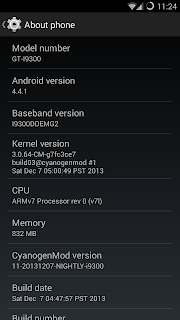
After the stable CM 10.2 Android 4.3.1 release, Yesterday CyanogenMod Team released the Official CM11 Android 4.4 builds for the recent nexus device like Nexus 4, 5, 7, and 10 etc. Today the team made it available to many none nexus devices with the old nexus brother Galaxy Nexus. The CM11 latest nightly is based on the latest Android 4.4.1 build.
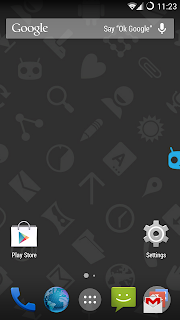
Just installed the cm11 ROM in my Galaxy S3 I9300, Touch is very smooth and gives an awesome performance. Tested WiFi,3G Data, Camera, YouTube Playback, Music playback in headphone and loudspeaker, Call, SMS etc. every thing works well.
Update:(10/02/2014)
CM11 M3 Build released with an updated version of the Trebuchet launcher based on Android 4.4 Launcher3 code.The update also include some user experience tweaks, the auto-start tweaks, some additional transparency support, and more.
Note:
I used the latest Clockworkmod recovery to flash the cm11 ROM as some users soft bricked their device flashing cm11 using TWRP and old CMW. So it is recommended to use latest Clockworkmod recovery to flash the CyanogenMod 11 build.
Disclaimer
Flashing custom ROM may brick device or void warranty ... I am not responsible for any damage do at your risk.
Must Note:
- Download the correct ROM zip for your device model
- Use Latest CWM Recovery ( flashing with other recovery may brick the device ) - How To Install Latest Clockworkmod recovery ?
- Make a Nandroid backup or manual backup and copy all data to pc or any external storage
- Your battery must be 50% or above
1. Download CM11 build for your device - Download
2. Download Official Gapps for CM11 - Download
3. Copy both files to sdcard
4. boot into clockworkmod recovery
5. In Order to perform a bug free installation perform all the operations below.
- Select Wipe data/Factory reset - yes
- Select Wipe cache partition - yes
- Go to Mounts and Storage and perform mount system, mount cache and mount data.
- Then Format System - yes
- Then Format cache - yes
- Then Format Data - yes
- Go back main menu of recovery again and go to Advanced-> Wipe Dalvik Cache - yes
6. Now Start Installation Steps
- Select install zip from sd card then choose zip from sdcard, find and locate the downloaded rom zip file and tap Yes to confirm the flashing process.
- After Install the ROM zip similarly install the Google Apps zip file.
7. After Completing all the installation do a wipe again
- Select Wipe data/Factory reset - yes
8. Now Reboot your device.
Thats ...it ...done ....
Just installed the cm11 ROM in my Galaxy S3 I9300, Touch is very smooth and gives an awesome performance. Tested WiFi,3G Data, Camera, YouTube Playback, Music playback in headphone and loudspeaker, Call, SMS etc. every thing works well.
Update:(10/02/2014)
CM11 M3 Build released with an updated version of the Trebuchet launcher based on Android 4.4 Launcher3 code.The update also include some user experience tweaks, the auto-start tweaks, some additional transparency support, and more.
Note:
I used the latest Clockworkmod recovery to flash the cm11 ROM as some users soft bricked their device flashing cm11 using TWRP and old CMW. So it is recommended to use latest Clockworkmod recovery to flash the CyanogenMod 11 build.
Disclaimer
Flashing custom ROM may brick device or void warranty ... I am not responsible for any damage do at your risk.
Install CyanogenMod 11 Official Android 4.4.1 Nightly Using Latest CWM Recovery
Must Note:
- Download the correct ROM zip for your device model
- Use Latest CWM Recovery ( flashing with other recovery may brick the device ) - How To Install Latest Clockworkmod recovery ?
- Make a Nandroid backup or manual backup and copy all data to pc or any external storage
- Your battery must be 50% or above
1. Download CM11 build for your device - Download
2. Download Official Gapps for CM11 - Download
3. Copy both files to sdcard
4. boot into clockworkmod recovery
5. In Order to perform a bug free installation perform all the operations below.
- Select Wipe data/Factory reset - yes
- Select Wipe cache partition - yes
- Go to Mounts and Storage and perform mount system, mount cache and mount data.
- Then Format System - yes
- Then Format cache - yes
- Then Format Data - yes
- Go back main menu of recovery again and go to Advanced-> Wipe Dalvik Cache - yes
6. Now Start Installation Steps
- Select install zip from sd card then choose zip from sdcard, find and locate the downloaded rom zip file and tap Yes to confirm the flashing process.
- After Install the ROM zip similarly install the Google Apps zip file.
7. After Completing all the installation do a wipe again
- Select Wipe data/Factory reset - yes
8. Now Reboot your device.
Thats ...it ...done ....
Available link for download
Subscribe to:
Comments (Atom)