Showing posts with label unbrick. Show all posts
Showing posts with label unbrick. Show all posts
Friday, December 30, 2016
How To Unbrick Amlogic Tablets
How To Unbrick Amlogic Tablets
Unbrick Any Amlogic Device
How to Unbrick Amlogic tablet .
amlogic boot card maker

This tutorial will guide you, how to unbrick your amlogic tablet or any amlogic device. If you mistakenly brick your amlogic tablet and wont able to flash it via Image Burning Tool , then this tutorial can help you to recover you amlogic tablet or any amlogic device. Bricked amlogic device means if your tablet or any amlogic CPU based device wont turn on or showing only light or generating below mention error on screen while writing amlogic firmware , then this Amlogic boot card maker tool can help you to write stock firmware on your amlogic devices.
Read : What is Stock Firmware .
There is also another method available to unbrick any android tablet, that is short circuit of nand flash pins , which is not easy for new user or not user friendly method but with amlogic boot card maker method you can easily boot your bricked android tablet .
example of semi bricked amlog tablet errors while flashing.
failed to mount data
Device cant mount
Invalid Arguments
How to unbrick Amlogic tablet
First of all download amlogic boot card maker .
Then download amlogic firmware regarding your tablet and extract .
extract and run bootcardmaker.exe

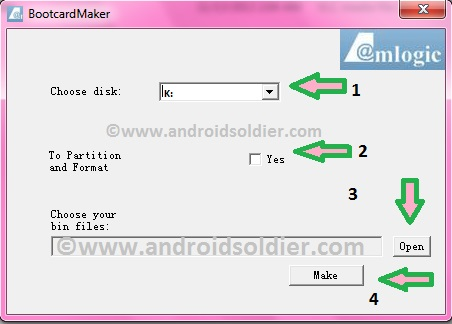
A pop up window will open and you will see few options.

1.Choose Disk: Select the drive of your microSD card.
2. To partition and Format: Check "YES". This will format your microSD card.
3. Choose your bin files : Click open and choose u-boot.bin from your stock amlogic firmware.
4. Make : Click on Make . This will turn your microSD card into bootable amlogic recovery disk. A green bar will be appear until card turn into recovery disk.
5. Now copy all files from stock amlogic firmware . (factory_update_param.aml, aml_autoscript, firmware.zip, recovery.img, unlock_autoscript and amlogic u-boot.bin)
Turn off your tablet , Insert memory card into tablet , Power up tablet , you will see recovery mode and flashing will be start automatically . When reboot , remove memory card wait for few minutes and let the update complete. After successful upgrade everything will be normal now , follow the instructions on screen and you are good to go.
This method will work on all amlogic cpu base devices . (e.g TV Box , Tablets ).
You may also like :
Amlogic 8726-MX Android Tablet Firmware
Amlogic Vero A7720 Android Tablet Firmware
Amlogic iJoy Neon Android Tablet Firmware
All the logo and images are property of their respective owners. Android Soldier does not claim any of it.
Available link for download

Friday, December 2, 2016
How to Unbrick Lenovo IDEATAB A1000 Android Tablets
How to Unbrick Lenovo IDEATAB A1000 Android Tablets
LENOVO IDEATAB
A Series
A1000
Android Tablets
How to Unbrick Lenovo Tablet Cause by Charging Issue and Power On problem.
 |
| Lenovo IdeaTab A1000 |
The lenovo Ideatab A1000 tablets sometimes cannot power on and charge with adapter , Usb or PC ,when power too low and system is under low power situation. These symptoms only appear to IdeaTab A1000 Tab. Other lenovo tablets does not face this kind problem. Lenovo tablets are high performance and best tablet in the market. The graphics, Material quality does not less from any other well named company.
How to Solve Charging Failure and Power on Issue :
1. Download IdeaTab A1000 fix tool.
2. Double click on icon to run the exe file and install Fix Tool.

Ideatab Unbricking
3. Run software , Insert data cable to Pc , Long press volume up key and insert cable. Click on Start (As shown in above image)
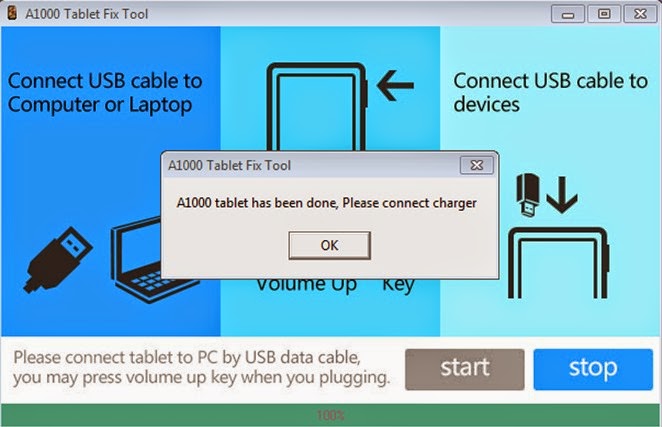
4. Fix Tool install patch automatically in tablet os system . A message window will pop up " Idea Tab A1000 tablet has been done , Please connect charger" Installation complete and tablet is updated. You are done .
Note: All the Names,logo,software,images are property of Lenovo.
Available link for download
Thursday, October 6, 2016
How to unbrick your phone Iris 504Q and also GAIN BACK WARRANTY
How to unbrick your phone Iris 504Q and also GAIN BACK WARRANTY
PROCEDURE:-
1.Make one folder on u r DESKTOP copy all necessary files.
2.First unrar VCOM drivers and install the driver till it comes dat it installed successfully
3.Then unrar sp flash tools and lava iris504q.xxx.4/28_DCC.rar file
4.Open sp flash tools(Flash_tool.exe)
NOTE:- DONT CONNECT U R PHONE YET!
5.Go in file tab and click on open scatter file
6.Now browse to the iris504q.xxx.4/28_DCC.rar file which u unrared and select MT6589_scatter txt file
7.All things inside the iris504q.xxx.4/28_DCC.rar file will load up
8.Now click on Firmware-->upgrade and it will search for the device
9.Now switch off ur phone (REMOVE BATTERY) and connect it with pc through usb cable.(WITHOUT BATTERY)
10.The tool automatically detects ur phone and starts d procedure
11.First a red line will come den after few seconds blue lines will load up den yellow and etc
12.When a green circle will come saying upgrade finished,just close that and d tool too.
13.Remove usb cable and switch on ur phone it will Boot up with all stock features.
14 After that follow d procedure and setup ur phone.
15 Now u can enjoy ur stock rom for warranty purposes and also for UNBRICKING IT!!!!
16.Enjoy and if any doubts ask me!!!!!
5.Go in file tab and click on open scatter file
6.Now browse to the iris504q.xxx.4/28_DCC.rar file which u unrared and select MT6589_scatter txt file
7.All things inside the iris504q.xxx.4/28_DCC.rar file will load up
8.Now click on Firmware-->upgrade and it will search for the device
9.Now switch off ur phone (REMOVE BATTERY) and connect it with pc through usb cable.(WITHOUT BATTERY)
10.The tool automatically detects ur phone and starts d procedure
11.First a red line will come den after few seconds blue lines will load up den yellow and etc
12.When a green circle will come saying upgrade finished,just close that and d tool too.
13.Remove usb cable and switch on ur phone it will Boot up with all stock features.
14 After that follow d procedure and setup ur phone.
15 Now u can enjoy ur stock rom for warranty purposes and also for UNBRICKING IT!!!!
16.Enjoy and if any doubts ask me!!!!!
Downloads:-
(This folder has all files)
MEGA
Available link for download
Subscribe to:
Posts (Atom)