Showing posts with label pattern. Show all posts
Showing posts with label pattern. Show all posts
Saturday, March 25, 2017
How to Set Pattern Lock on HTC One M8
How to Set Pattern Lock on HTC One M8
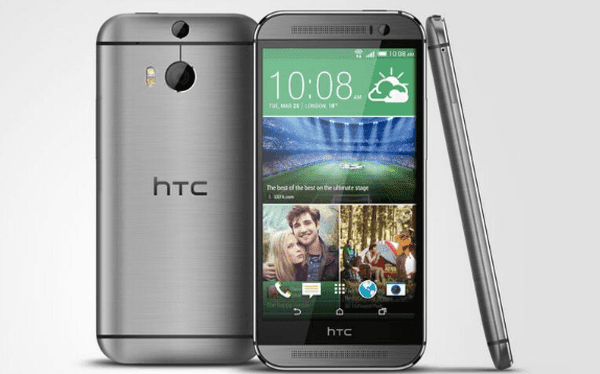
Will you be pleasant when anyone else picks up your HTC One M8 phone and plays games, views text messages and checks other content without asking your permission? Your answer is, of course, a big “No”. To indirectly tell others not to use your phone without your agreement, just set a pattern lock to your phone, following the 6 steps introduced below.
Step 1: Open Settings in the phone.
Step 2: Find and select Security.
Step 3: Choose Screen lock to move on.
Step 4: Select Pattern from the screen lock options.
Step 5: Draw a pattern which connects at least 4 dots, and click CONTINUE when it is recorded.
Step 6: Re-draw the pattern and tap CONFIRM.
Related Articles:
- How to Set Password on HTC One M8
- How to Set Password on HTC One M7
- Android USB Drivers for HTC
- Restore Deleted SMS on HTC One Mini Android Phone
Available link for download

Saturday, February 11, 2017
How to Set Pattern Lock on Samsung Galaxy Gio GT S5660
How to Set Pattern Lock on Samsung Galaxy Gio GT S5660

Almost every day, you can see people around you draw diversified patterns on the phone screens to unlock their phones. If you haven’t set a pattern lock on your Samsung Galaxy Gio GT-S5660 phone, your curiosity for the method to set it by yourself will definitely be aroused. Hence, this post illustrates the detailed steps for your reference.
Steps to set a pattern lock on Samsung Galaxy Gio GT-S5660:
Step 1: Open Settings in the phone.
Step 2: Find and access Location and security.
Step 3: Locate and click Set screen lock.
Step 4: Choose Pattern to move on.
Step 5: Draw a pattern and tap Continue. Meanwhile, please note that the pattern must connect at least 4 dots.
Step 6: Draw the pattern again and click Confirm.
Related Articles:
How to Create A PIN Lock for Samsung Galaxy Gio GT-S5660
How to Set Password on Samsung GT-I8190N
How to Set Password on Samsung GT-I8268
Android USB Driver for Samsung
Available link for download
Wednesday, December 21, 2016
How to Unlock ByPass a Pattern Lock on an Android Device Without Loosing Data
How to Unlock ByPass a Pattern Lock on an Android Device Without Loosing Data

So you are here cuz you probably have had set a Pattern lock on your android device, and baaah BAD LUCK you forgot the the pattern. So just rather than getting a whole factory reset of your devise we have a very easy and nice tutorial to get your Phone unlocked while not even loosing a single contact out of your Phone.

Well many other are here cuz they want to spy on a friends android device but damn th pattern lock is not letting them. So chill out and Spy tight as we have a set of instruction and a very nice post on Unlocking a Friends android Pattern lock.
Hello friends today we are here to help you about how to bypass the pattern lock on an android device. Have you sometime suffered with Locked out? Do you know how to bypass the pattern lock? Did you try it out on your own anytime?
Pattern lock on an android device provides users a great security which further prevents your smartphone with any accidental taps like theft or misuse. If a user wants to use this security feature on their android device then they have to customize it under the settings option in menu.
It happens that sometimes users forget the pattern of lock of their devices and in panic they start guessing the pattern and finally comes with a problem of locked out. Users and dear users don’t be so panic as if is facing any problem there is a definite solution to that problem as well. If you face a locked out then you can bypass the pattern lock.
There is very commonly used method to bypass android pattern lock which you have forgotten bu that will for sure make you loose all your data and all your contacts and everything. in other words it will make the phone a device the same as your bought with everything wiped off including all applications. This can be dony by going into the recovery mode of any android device. and then select factory reset option. This is not recommended as for 2 reasons, first, It will clear all your data, second, we have a better option left with us !
You don’t know how to bypass the pattern lock. No worries at all. We will help you out and you just need to follow some ADB commands and then you can finally bypass the pattern lock on anandroid device. Just go through the following guide tutorial very carefully step-by-step so as to bypass the pattern lock.
SOME BASIC STEPS BEFORE YOU BEGIN Unlock & ByPass a Pattern Lock on an Android Device Without Loosing Data
- The very first and important need is the ADB drivers that must be installed in your PC.
- Then it is really important that the USB debugging must be enabled before your device being locked.
- You should be very carefull while installing the drivers of your device. This technique will not work without installing the specific drivers.
Users might feel really annoyed and irritated when they tried the pattern lock several times in panic and unfortunately their android smartphone displayed locked out. Further users cannot access their android smartphone and at last need to bypass the pattern lock.
HOW TO BYPASS THE PATTERN LOCK ON AN ANDROID DEVICE
Just Follow the easy tutorial to Unlock an android’s pattern lock without factory reset after when you have forgotten it. And yes its that easy as it sounds.
- Users need to connect their android device via USB cable to PC.
- You must now open the folder where you installed ADB driver.
- Now you just have to click right on the screen’s blank area along with hold the shift key and select “OPEN COMMAND WINDOW”.
- A window command will prompt and then you just need to type the following:
adb shell
cd /data/data/com.android.providers.settings/databases
sqlite3 settings.db
update system set value=0 where name=lock_pattern_autolock;
update system set value=0 where name=lockscreen.lockedoutpermanently;
.quit
- Once it has been done then you have to reboot your android device.
- Now it is all done and set.

After following this guide tutorial now you can access your android device as the pattern lock has been completely disabled.
There is another method not to bypass the lock pattern on and android device but to get your device being unlocked. It is through G MAIL. When you face problem of locked out just click on forgot pattern and follow the basic instructions that follow.
If this guide tutorial really helped you out then please share your experiences with us. And if still any problem persists you can ask for our help and we are there to help you out.
That was it now you can easily unlock any of your friends Phone without even letting him know and making use of it for your propose. But ill not recommend this as the so called friend of yours may punch punch back in your face.
So anything not working with the post or anything you are confused with, just let us know in the comment section below or contact us from the top menu.
Available link for download
Subscribe to:
Posts (Atom)