Showing posts with label xiaomi. Show all posts
Showing posts with label xiaomi. Show all posts
Thursday, December 15, 2016
How to update multiple languages ROM for Xiaomi Mobile Phone
How to update multiple languages ROM for Xiaomi Mobile Phone

Method 1. The upgrade method
Flashing full MIUI ROM pack on the phone (This part applies to all the xiaomi phone models.). Download necessary files to prepare for flashing MIUI ROM
Note: Flashing a newer version of MIUI ROM doesn’t need to wipe data, but flashing an older one does.
STEP 1
Download the multilingual MIUIROM. If you have downloaded the latest installation pack, there is no need to download it again.
STEP 2
Connect your phone to the computer, and put the ROM file to the folder downloaded_rom in the SD card. Open Updater on the launcher, press the Menubutton – Select installation file. Choose the ROM pack you want to flash, and select Update now. How to update multiple languages ROM for Xiaomi Mobile Phone
STEP 3
After updating is completed, select Reboot now to enter the new system. How to update multiple languages ROM for Xiaomi Mobile Phone
Method 2. Updating zip file in Recovery
Please make sure that your phone has enough power.
STEP 1:
Download the multilingual MIUI ROM. Operate on the computer, rename the zip file as update.zip, and copy it to the root directory of the SD card. The update.zip copied from SD card to internal storage
STEP 2:
Enter Updater, press the Menu button, and select Reboot to recovery mode. Another way to enter recovery mode: turn off the phone, press the Volume+ key and the Power button at the same time, wait until the screen wakes.
STEP 3:
Select yourlanguage. Select to install update.zip to system one (use the volume keys to select, and the Power button to confirm). After the updating is completed, reboot to system one. How to update multiple languages ROM for Xiaomi Mobile Phone.
Flashing full MIUI ROM pack on the phone (This part applies to all the xiaomi phone models.). Download necessary files to prepare for flashing MIUI ROM
Note: Flashing a newer version of MIUI ROM doesn’t need to wipe data, but flashing an older one does.
STEP 1
Download the multilingual MIUIROM. If you have downloaded the latest installation pack, there is no need to download it again.
STEP 2
Connect your phone to the computer, and put the ROM file to the folder downloaded_rom in the SD card. Open Updater on the launcher, press the Menubutton – Select installation file. Choose the ROM pack you want to flash, and select Update now. How to update multiple languages ROM for Xiaomi Mobile Phone
STEP 3
After updating is completed, select Reboot now to enter the new system. How to update multiple languages ROM for Xiaomi Mobile Phone
Method 2. Updating zip file in Recovery
Please make sure that your phone has enough power.
STEP 1:
Download the multilingual MIUI ROM. Operate on the computer, rename the zip file as update.zip, and copy it to the root directory of the SD card. The update.zip copied from SD card to internal storage
STEP 2:
Enter Updater, press the Menu button, and select Reboot to recovery mode. Another way to enter recovery mode: turn off the phone, press the Volume+ key and the Power button at the same time, wait until the screen wakes.
STEP 3:
Select yourlanguage. Select to install update.zip to system one (use the volume keys to select, and the Power button to confirm). After the updating is completed, reboot to system one. How to update multiple languages ROM for Xiaomi Mobile Phone.


Don’t miss any of our future video tutorials, follow us on Youtube. Like us on Facebook. Add us in your circles on Google+. Watch our photo albums on Flickr. Subscribe now to our newsletter.
Available link for download

Sunday, October 16, 2016
How To Take Screenshot in Xiaomi Redmi 2 And Other MI Devices
How To Take Screenshot in Xiaomi Redmi 2 And Other MI Devices
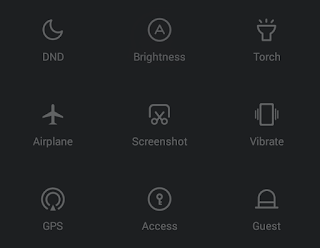 Yesterday, I wrote about rooting Xiaomi Redmi 2 and here I am writing about the built in method to take screenshot in Xiaomi Redmi 2 and other mi devices. In Xiaomi devices, there are two methods available to capture the screen. Notification drawer toggle and Key combination method.
Xiaomi Redmi 2 Screenshot Using Notification drawer button
1. Go to the desired screen you wish to capture.2. Swipe down Notification drawer and scroll down until you reach Screenshot button.
3. Now tap on the Screenshot button.

Xiaomi Redmi 2 Screenshot Using Key Combination Method
1. Go to the desired screen you wish to capture.2. Press and hold Volume down and Power button together for 2-3 seconds.
Thats it.. To get the captured screen shot Go to Gallery -> Screenshots Or Go to DCIM/Screenshots using any file manager.
Available link for download
Subscribe to:
Posts (Atom)