Showing posts with label smartphone. Show all posts
Showing posts with label smartphone. Show all posts
Friday, February 17, 2017
HTC smartphone stuck in bootloader Solution
HTC smartphone stuck in bootloader Solution
How to fix HTC smartphone stuck in bootloader and wont turn on cause of low battery.
Solution : how to unbrick HTC android cellphone

HTC smart phones are best android cellphone in the market with competition of other well known brands. Sometimes HTC phones stuck into bootloader and wont turn on . The cause of this problem is your smartphone battery is too low , you were trying to update your android cellphone or you were playing with bootloader. This tutorial will only solve the problem and bring your HTC phone back from the problem if your HTC phone is stuck into bootloop caused by too low battery less than 10% and you are not able to charge your android cellphone battery via socket charger or usb .
Note: (3875mV is equal to 10% of battery charging).
So whats the solution ?
Debug mode is not necessary for this process . All you have to do is turn your htc smartphone bootloader.Method 1.
Copy these codes and paste them into .txt file then convert it to .bat file.
@echo off
:start
fastboot getvar battery-voltage
fastboot reboot-bootloader
ping /n 6 localhost >nul
goto start
Method 2.
Download the text file contain on these codes and rename .txt to .bat. You can also change file name .

use adb commands to write these codes step by step.
(Following method 1 and 2).

Copy .bat file into android-sdk folder . (C:Program Files/Android/Android-sdk/platform-tools ). Double click on .bat file . In the return you will see different lines running in command prompt . You will also notice battery voltage start increasing with every step. Your HTC android cellphone keep restarting after increase of every volt of battery. The process will take upto 1 hour(depend on the voltage of your battery) to increase your smartphone battery voltage to meet the minimum boot requirement by HTC. Minimum 3850mV is required to light up any HTC android cellphone but you can increase the mV level as high as you want.

- The following method was adopted from xda-developers.com and tested by myself. Android soldier does not claim any rights to above said method and programing file or codes. All credit goes to its original owner. All the logos are property of their respective owners. If you have inquiries regarding this post please write in comments section.
Available link for download

install Android apps games remotely in Android Smartphone and Tablets
install Android apps games remotely in Android Smartphone and Tablets
How to install Android apps & games remotely in Android Smartphone and Tablets .
Install directly from Google Play Store without touching Android Smartphones or tablets.
Google has facilitate its customer as much as they can . With incredible services and offers , Google is always world number 1 with search engine , Google play store ,developments, blogging, webmaster tools,SEO (search engine optimization ), advertising and of course Android and many more . On Google Play Store you can find million apps and games for your smartphones and tablet which facilitate and make your life easier. Its too easy to install apps and games via WIFI or 3G from Google Play Store. Tap Google Play Store Icon and simply find out what you need. There is another superb option or method for installing android apps and games remotely into your smartphone or tablet without touching or in case its thousand miles away from you .
1. On smartphone or tablet , Activate WIFI , or 3G . Then go to setting --Accounts--Add account--Gmail.
2. Add your gmail account and password.
3. Open https://play.google.com/store on your computer .

5.Choose any app or game . (for tutorial I choose Sketch Art).
2. Add your gmail account and password.
3. Open https://play.google.com/store on your computer .
4. Sign In with same Gmail account which you already added in your smartphones or android tablets.
5.Choose any app or game . (for tutorial I choose Sketch Art).

6. Click Install .

7. Choose a desired device (if you have more than one devices synchronised ) and click install . I have selected Samsung Galaxy S2 GT-1900 for the tutorial .

8.A Congratulations message will be appeared .
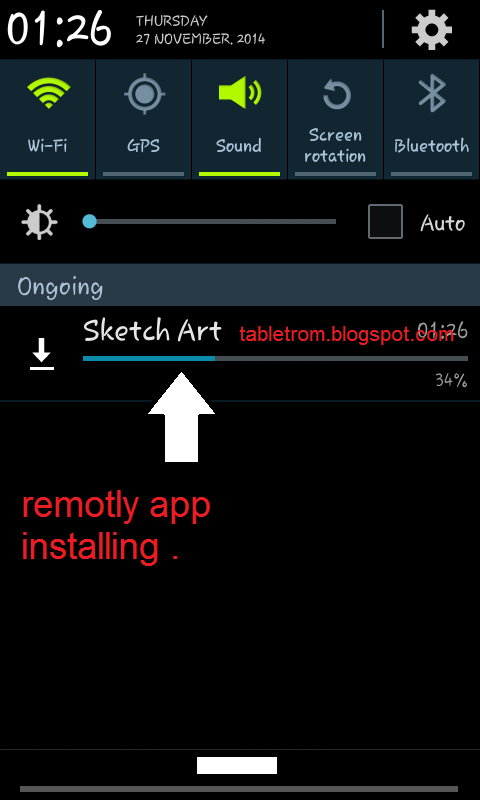
9. Just look at the smartphone you will see automatically application downloading will be started. (as shown above image).
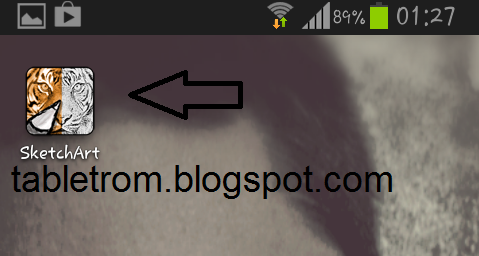
10. You are done .
Now enjoy the great benefit of being Android and Google User.
Note:- All the logo and images are property of their respected owners.
Available link for download
Thursday, November 24, 2016
Inilah 10 Smartphone Terbaik 2016 Versi Antutu Benchmark
Inilah 10 Smartphone Terbaik 2016 Versi Antutu Benchmark

Setiap kuartal (empat bulan sekali), AnTuTu mengungkapkan smartphone terbaik yang beredar dipasaran. Dan seperti biasanya iPhone dan smartphone flagship Galaxy buatan Samsung selalu menguasai posisi puncak selama ini. Namun tahun ini berbeda, dengan semakin banyak vendor smartphone asal Cina yang merilis smartphone canggih ke pasaran ternyata berhasil merubah dominasi posisi puncak daftar smartphone terbaik 2016.
Dari daftar terbaru yang dirilis AnTuTu benchmark dari 10 Smartphone terbaik 2016 pada kuartal pertama ternyata berhasil dikuasain oleh 5 merek vendor smartphone dari Cina. Memang sudah bisa diprediksi dengan banyaknya peluncuran smartphone canggih dari negeri tirai bambu ini selama beberapa bulan terakhir.
Tahun lalu, sejak AnTuTu mulai melakukan benchmark untuk berbagai sistem operasi yang berbeda dan menggabungkannya dalam sebuah daftar yang sama, iPhone 6S telah berhasil mendominasi berbagai daftar smartphone terbaik dengan kecanggihan prosesor Apple A9 didalamnya. Tapi sekarang, semuanya berubah ketika smartphone seri flagship Xiaomi Mi 5 ternyata berhasil menyentuh skor angka benchmark lebih dari 136.875 dan menguasai posisi tertinggi smartphone terbaik.
Sebelum keheranan kalian berlanjut, yang perlu diketahui adalah Antutu mengambil skor angka rata-rata smartphone dengan melakukan perbandingan terhadap lebih dari 500 data berbeda dari smartphone yang ada. Dan peringkat ini hanya menunjukkan data statistik dari peringkat 10 smartphone terbaik 2016 pada kuartal pertama saja yaitu mulai dari 1 Januari hingga 31 Maret 2016.
Setelah Xiaomi Mi 5, tentu saja smartphone Edge Galaxy S7 / S7. Dan Galaxy S7 ini akan mampu mengalahkan Xiaomi Mi 5 jika saja tidak menggunakan tampilan layar 2K. Posisi berikutnya diduduki oleh iPhone 6S, dengan skor yang sangat dekat dengan Galaxy S7. Setelah ketiga smartphone ini, hadirlah jagoan baru yaitu smartphone Huawei Mate 8.Namun terihat adanya perbedaan angka yang cukup signifikan antara posisi ketiga dengan keempat yaitu sekitar 42ribu point. Namun dengan prosesor Kirin 950 (prosesor buatan Huawei) yang ditancapkan dalam Huawei Mate 8 dan berhasil menduduki posisi keempat, hal ini cukup mengesankan dan menunjukkan bahwa smartphone dengan prosesor Kirin ini telah berkembang cukup pesat dalam beberapa tahun terakhir.
Sisa tempat berikutnya dari daftar 10 smartphone terbaik 2016 in dikuasai oleh seri smartphone tahun lalu, kecuali untuk Vivo Xplay 5 Standard edition dengan prosesor Snapdragon 652. Pertanyaan yang muncul dari daftar ini adalah, kenapa seri Xplay 5 Elite edition tidak berhasil masuk kedalam daftar 10 smartphone terbaik 2016 ini, padahal smartphone tersebut dilengkapi dengan prosesor Snapdragon 820 dan RAM 6 GB.
Menurut Antutu, hingga saat ini seri smartphone canggih tersebut hanya menyediakan sekitar 18 data saja yang bisa dilakukan uji coba benchmark oleh Antutu dimana jumlah data tersebut terbilang masih sangat sedikit, jadi meskipun angka rata-rata benchmark smartphone tersebut berhasil muncul dan mendekati skor 130.298 namun tidak bisa dimasukkan dalam daftar karena tidak berimbang mungkin daftar smartphone terbaik 2016 pada kuartal kedua nanti smartphone canggih ini bisa masuk dalam daftar.
Sumber : http://arenalte.com/life/rekomendasi/10-smartphone-terbaik-2016-versi-antutu-benchmark/
Available link for download
Subscribe to:
Posts (Atom)